01
Ragebait
Provocation aimed at anger or hostile engagement. Not just an opinion you disagree with.
A referee, not a filter bubble.
Chrome extension / v1.1.0Less bait. Your call.
Jev flags ragebait, promo, AI Slop, and engagement farming while you scroll X. Keep the labels, or collapse the noise.
Desktop Chrome / Chromium. Bring your own TypeSafe key.
Opens GitHub. Install unpacked, not from the Web Store.
Each label is judged independently. Badges appear at 70% or above, and one post can get more than one.
Provocation aimed at anger or hostile engagement. Not just an opinion you disagree with.
Pushing a product, service, project, or signup. Promotion isn't necessarily a bad thing.
AI-like writing patterns and canned filler. A style estimate, not proof of AI authorship.
Fishing for replies, likes, reposts, or follows rather than sharing something of substance.
[ On your terms ]
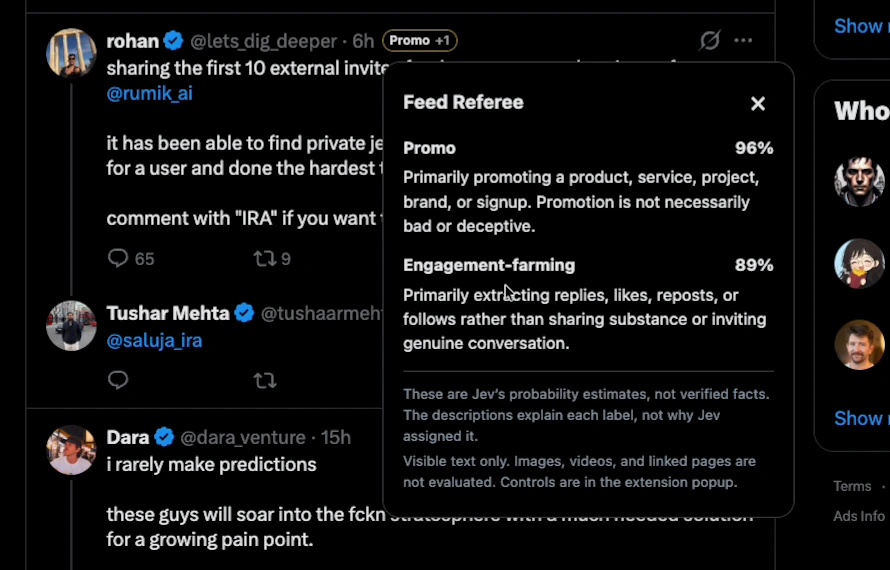
01 / In the name row
Compact labels sit alongside the author. Click for probabilities and what each label means. No feed reordering, no auto-likes, no auto-replies.
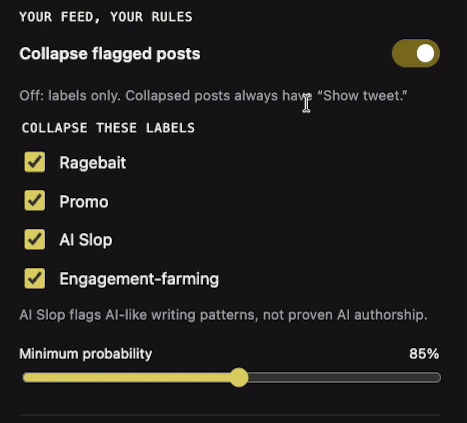
02 / You make the call
Collapsing is off by default. Choose labels and a threshold in the popup. Changes autosave, and Show tweet always brings a collapsed post back.
Screenshots from the real demo. Click to enlarge.
[ Get it running ]
No Jev Experiments account. The extension talks directly to TypeSafe, and API usage is billed to your TypeSafe account.
Get a TypeSafe key ↗Open the GitHub download instructions ↗. Get the Feed Referee ZIP from Releases and extract it. Keep the extracted folder somewhere permanent.
In desktop Chrome, open chrome://extensions. Enable Developer mode, choose Load unpacked, and select the extracted feed-referee folder containing manifest.json.
Pin Feed Referee. Paste your own TypeSafe key, review the data-sharing notice, and set a daily request cap. It starts paused. Enable it, then open or reload X.
On supported, visible posts across X: Home, profiles, post pages and replies, search, lists, and bookmarks. It checks the main column in active tabs. Individual post pages show labels without collapsing the post or its replies. X layout changes can require an extension update.
No. DMs, composers, drafts, account/settings screens, and dialog content are excluded. It judges the text X has loaded, plus quoted text for context. No images, videos, or linked pages are analyzed. Expanding a truncated post can update its judgment.
When enabled, post text goes directly from the extension to TypeSafe using your own API key. This can include protected posts you can view. No requests go through Jev Experiments servers, and the extension has no analytics or telemetry. TypeSafe's own terms and privacy policy apply.
The extension download is free. Jev requests are billed to your TypeSafe account. New installs have a 2,000-request daily cap that you can lower in the popup. Attempts, including failures and retries, count across tabs and reset at midnight UTC. This is a request cap, not a dollar spending limit.
No. These are model probability estimates, not verified facts. Context, irony, and language can affect the result. AI Slop does not prove who or what wrote a post. Nothing is hidden by default, and every collapsed post has a Show tweet button.
Not yet. Download it from GitHub and use Chrome's Load unpacked option. It requires desktop Chrome 120+ or a compatible Chromium browser, plus your own TypeSafe key. Updates are manual: replace the unpacked files, then click Reload on the extension card.
Give your feed a second opinion.
Source available. Your own key. Always your call.